HisLinks
A Gay Dating App for iPhone Duo: HisLinks on the Foldable Screen
As of November 2026, to our knowledge HisLinks is the first gay dating app to fully support the iPhone Duo's screen resolutions: folded, it's a normal phone layout, and opened, it becomes two columns with the list on the left and the chat on the right. This post uses screenshots to show each way of holding it, and how to update.

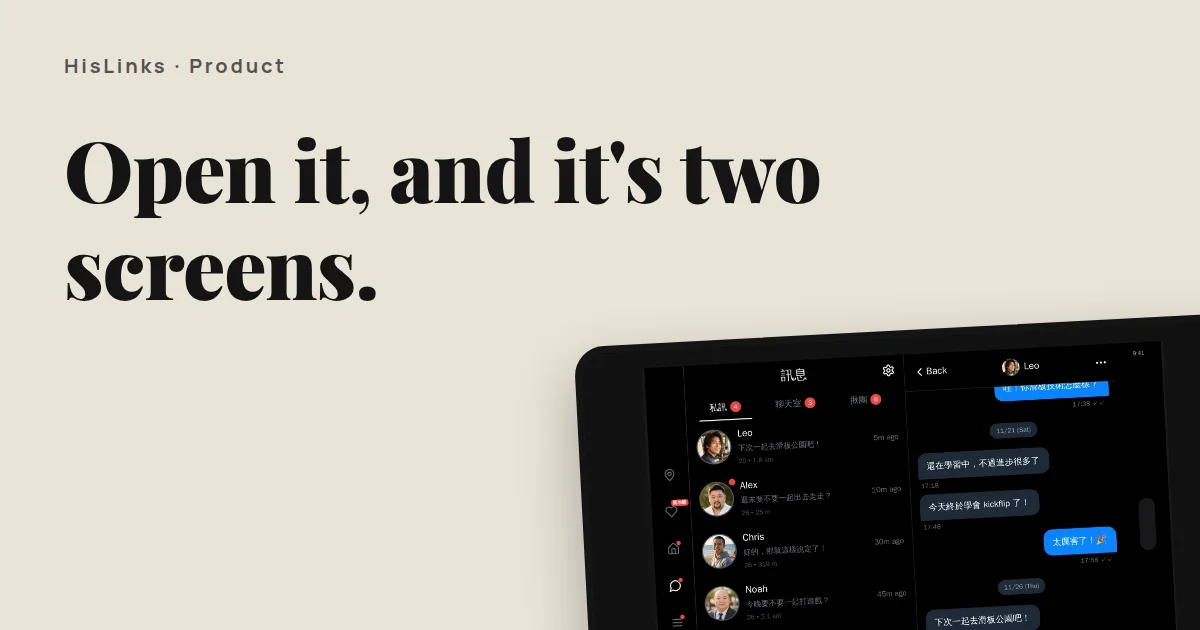
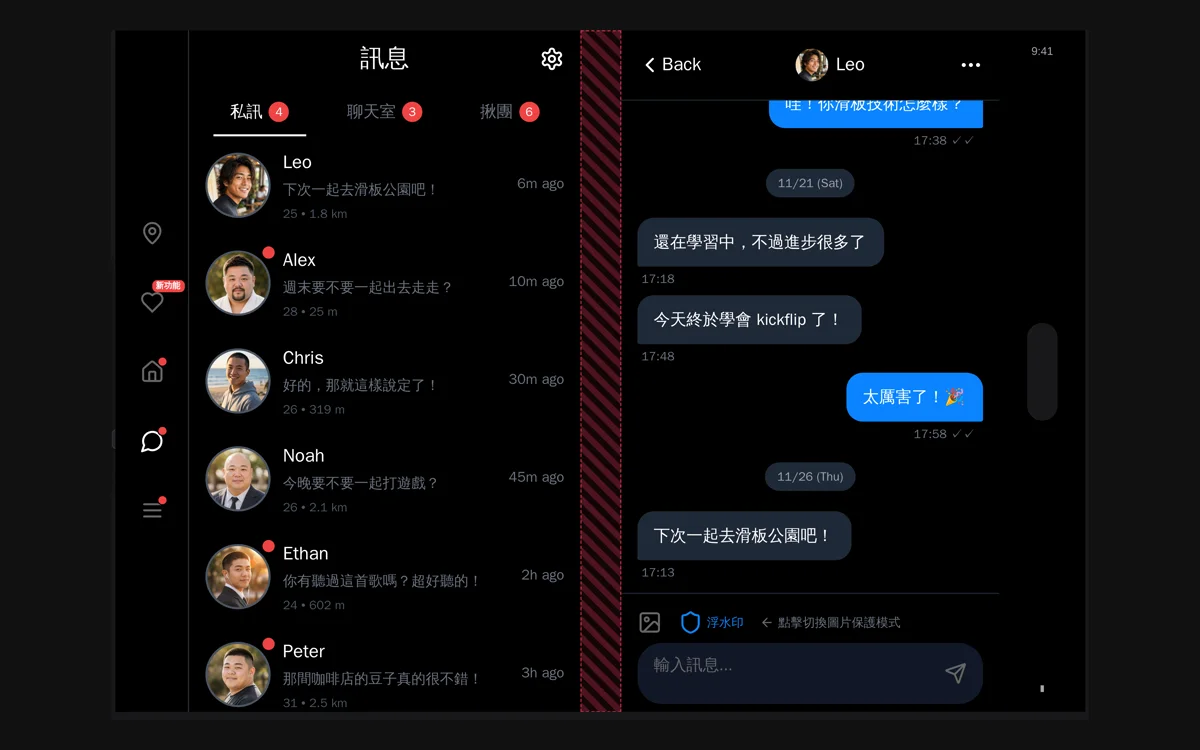
As of November 2026, to our knowledge, HisLinks is the first gay dating app to fully support the iPhone Duo's screen resolutions, with a layout for both the inner and outer screens. When you use the outer screen folded, it is a normal phone layout. When you open it, the screen splits into two columns: the list on the left, and whatever you tapped on the right, so you don't keep pressing back. The iOS version supports it from 1.2.7, and you get it by updating in the App Store.
By "full support" we mean: the outer screen, the inner screen in portrait, the inner screen in landscape and half-open each have their own layout, with no black borders. We haven't seen any other gay dating app announce the same support.
What does an app that hasn't updated look like on iPhone Duo?
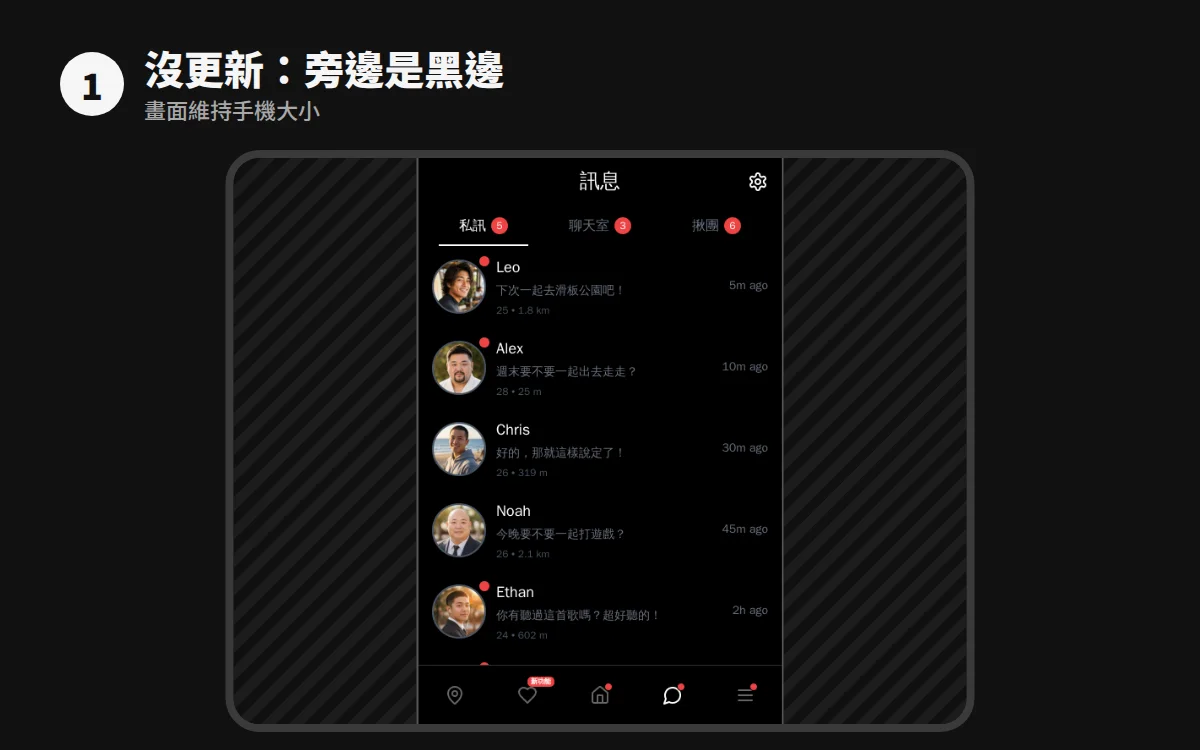
An app that hasn't been updated for iPhone Duo runs in compatibility mode on the inner screen: the app keeps its original size, with a black background around it.
The iPhone Duo went on sale on October 23, 2026. The outer screen is about 5.4 inches, and the inner screen, opened, is about 7.6 inches. According to 9to5Mac's summary of Apple's guidance for developers, apps not yet updated for iOS 27 use the default compatibility mode, placing a single screen inside the safe area with black around it. Only updated apps use the larger screen area.
People have also discussed this on PTT's iOS board, a Chinese-language forum. One user shared impressions after a few days of use and said the black borders beside the inner screen are "just waiting for apps and software to support it." In the replies, some worried that developers won't redo layouts for a small group of foldable users, and others thought apps that don't keep up will be replaced by other apps.

For a dating app, the difference is obvious: the inner screen is extra space, and it would be a shame to use it only for black borders.
Do other gay dating apps support iPhone Duo yet?
As of November 2026, we checked nine common gay dating apps, and none of them announces full support for both iPhone Duo screens on the App Store.
The survey cutoff was November 2026. We looked at each app's version history and store description on the App Store to see whether it mentions iPhone Duo or foldable screens:
- Grindr 26.26.0 (2026-11-18): not mentioned.
- Hornet 10.0.0 (2026-11-17): not mentioned.
- HeeSay (formerly Blued) 5.15.4 (2026-11-23): not mentioned.
- Jack'd 8.20.0 (2026-11-16): not mentioned.
- 9monsters 4.18.14 (2026-11-24): mentioned. The update notes say it fixes layout problems on some screens on the iPhone Duo outer screen.
- GROWLr 16.55.0 (2026-11-19): not mentioned.
- SCRUFF 8.20.0 (2026-11-25): not mentioned.
- Gsland 1.9.2 (2026-11-11): not mentioned.
- Prido 2.12.0 (2026-09-23): not mentioned.
Of the nine, 9monsters is the only one that mentions iPhone Duo in its update notes, which is a quick move. What it says is a fix for layout problems on the outer screen, meaning the existing screens now display correctly on the new device. The update notes don't mention a new layout for the inner screen.
What is the difference between "runs on iPhone Duo" and "designed for iPhone Duo"?
An app's support for iPhone Duo falls into roughly three levels. The three images below use the same screen (the HisLinks messages page) to show what each looks like on the inner screen in landscape.
Level one: not updated. The inner screen shows it in compatibility mode, with the screen kept at phone size and black borders on the sides.
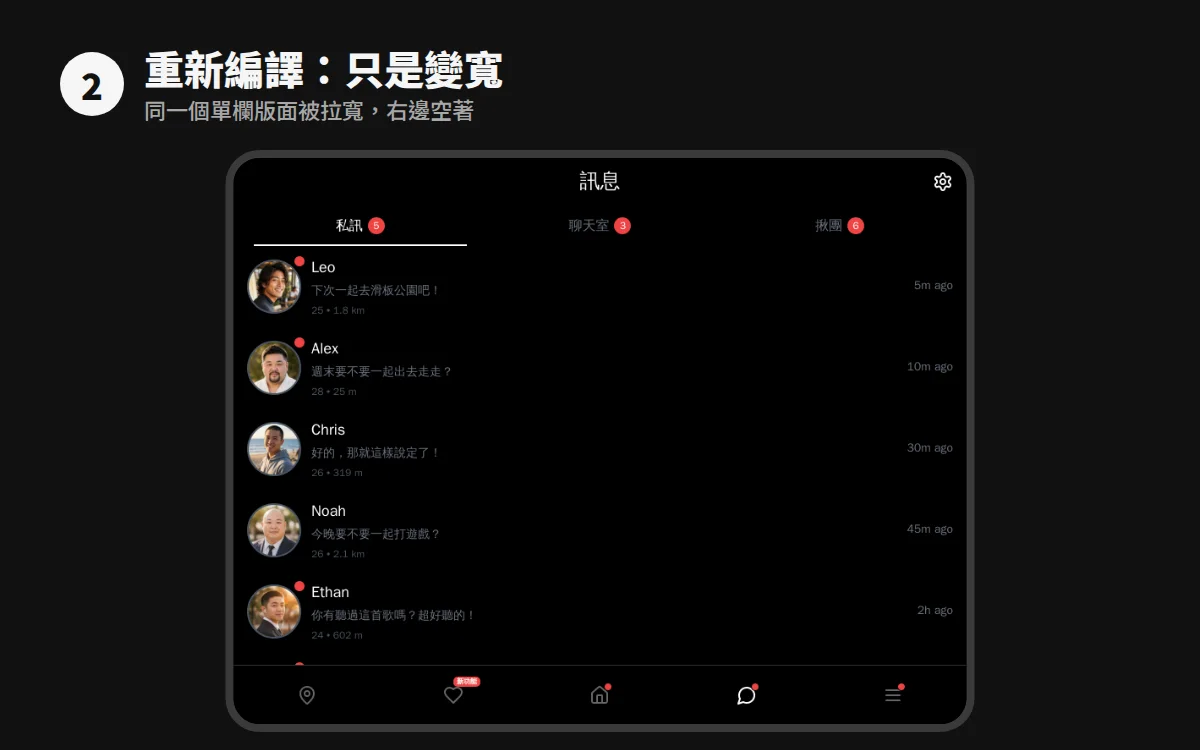
Level two: recompiled with the new SDK, layout problems fixed. The black borders are gone, but it is still the same single-column phone layout, just stretched wider. A large blank area is left to the right of the list, and opening a conversation still switches the whole page.
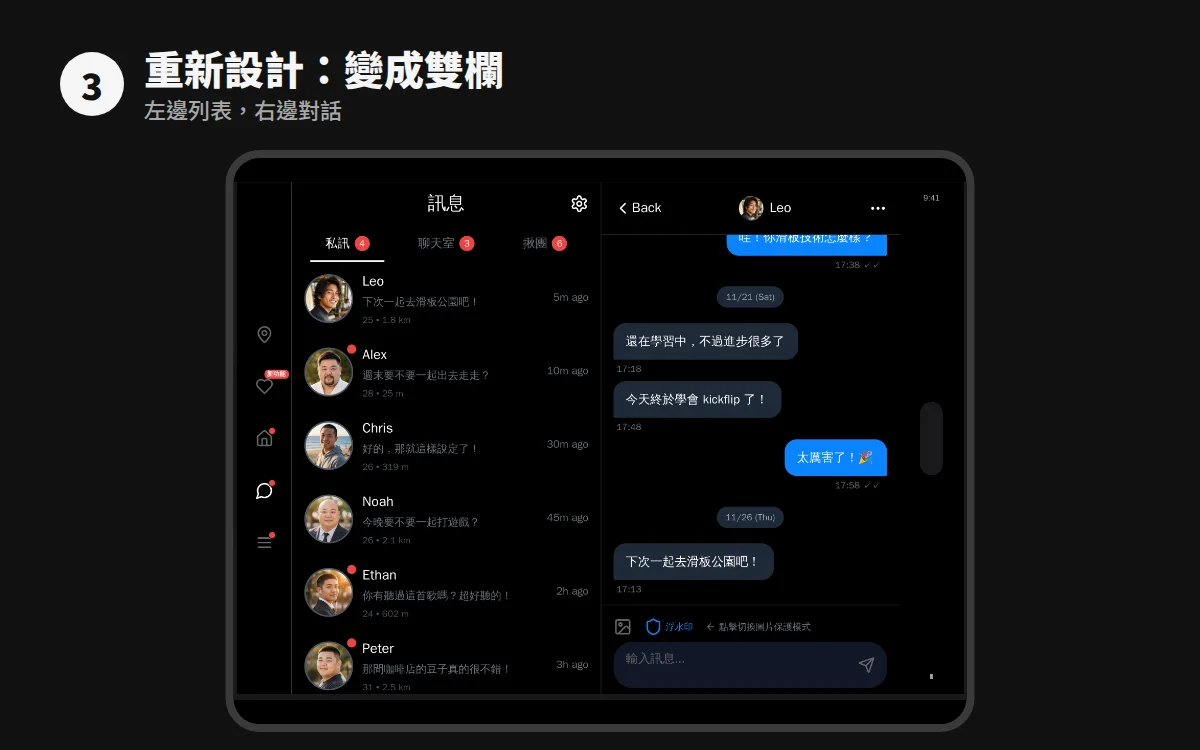
Level three: layout redesigned for both screens. The inner screen shows one more level of content, with the list on the left and the conversation on the right. When half-open, it avoids the fold, and when folding and opening it stays on the same page.
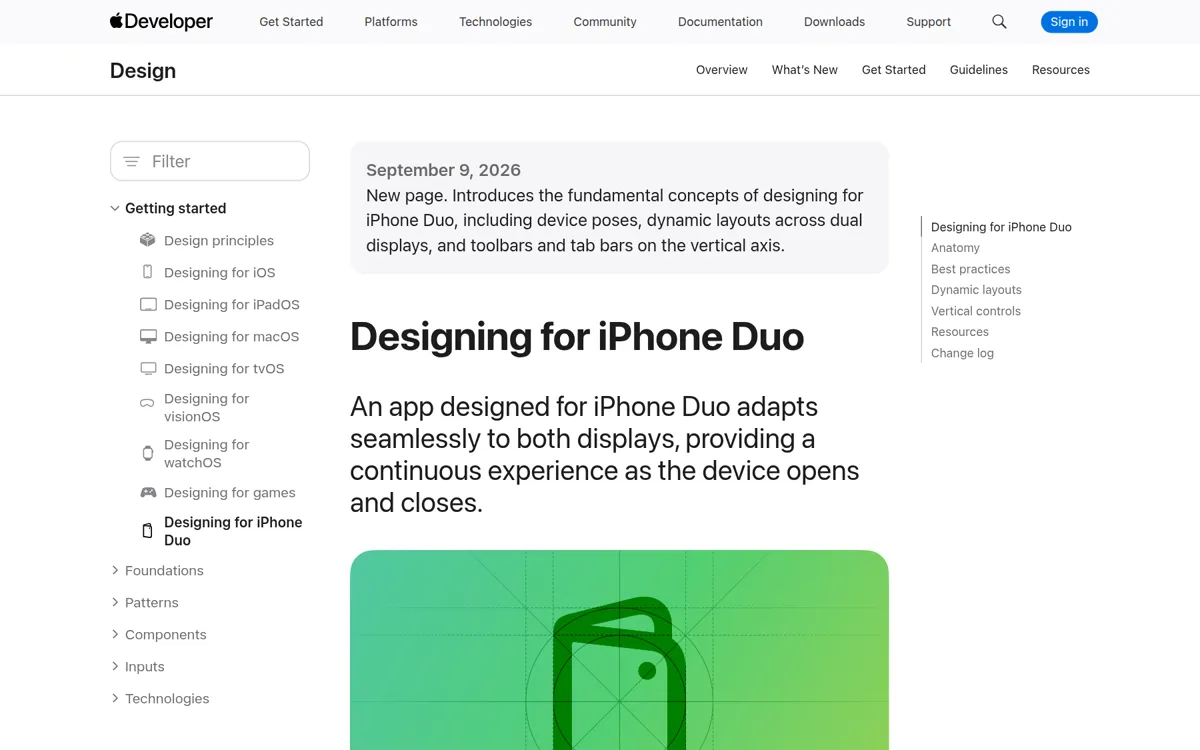
Apple's design guidelines describe level three: showing one more level of content on the larger inner screen, with Mail as an example, where opening it shows the message list on the left and the message content on the right. HisLinks does level three.
To find out how far an app has gone, the fastest way is to open the iPhone Duo and hold it in landscape. If the screen just gets wider, that is level two. If it becomes two columns, that is level three.
To be clear, the survey above is based on public information on store pages. Not written does not mean not done, and each app may update soon. So our wording is "as of November 2026, to our knowledge the first to fully support": the outer screen, the inner screen in portrait, the inner screen in landscape and half-open all have a matching layout. If other apps catch up later, this section will be updated.
What does HisLinks look like on the iPhone Duo outer and inner screens?
The outer screen is the phone layout you know. On the inner screen in portrait, one page shows more people. On the inner screen in landscape, it becomes two columns.
Apple's design guidelines recommend keeping the experience consistent across the two screens, and showing one more level of content on the larger inner screen. HisLinks follows this principle: the features and where they are stay the same, but once opened, you see more at a time.
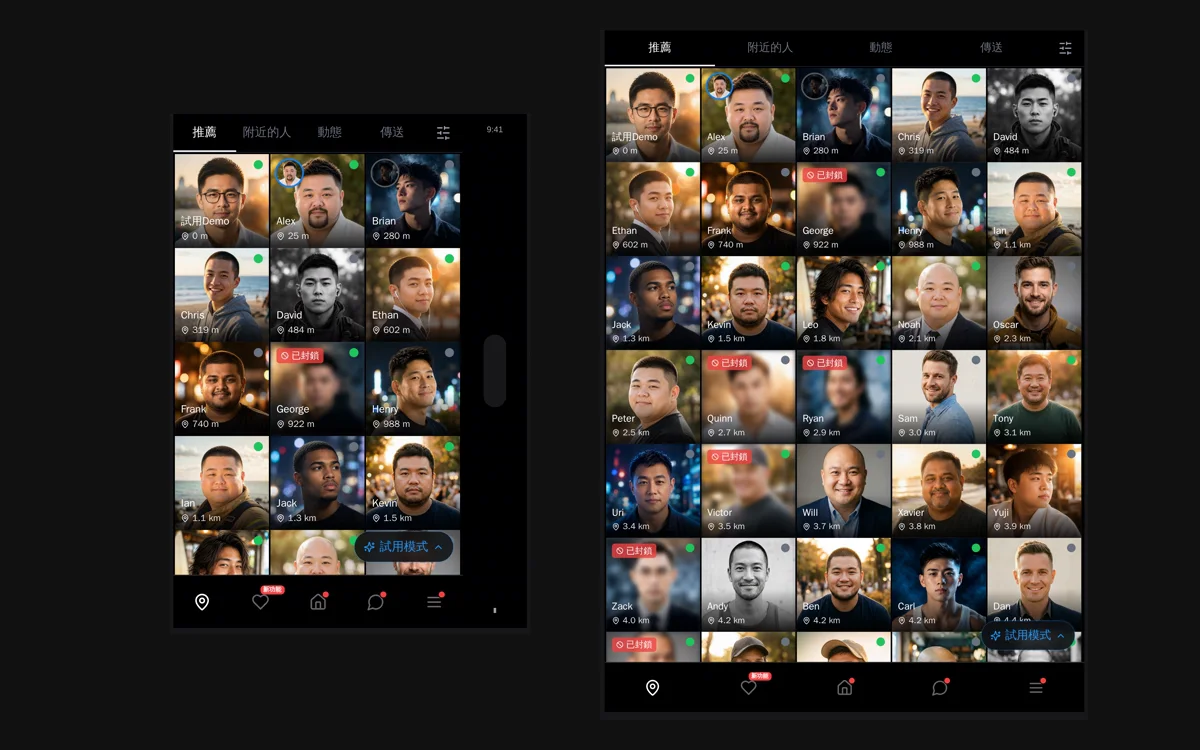
When folded, the Explore page shows three photos per row. Opened and held upright, a row becomes five photos, so you see more people nearby without scrolling.
How do you use the two-column screen once it's open?
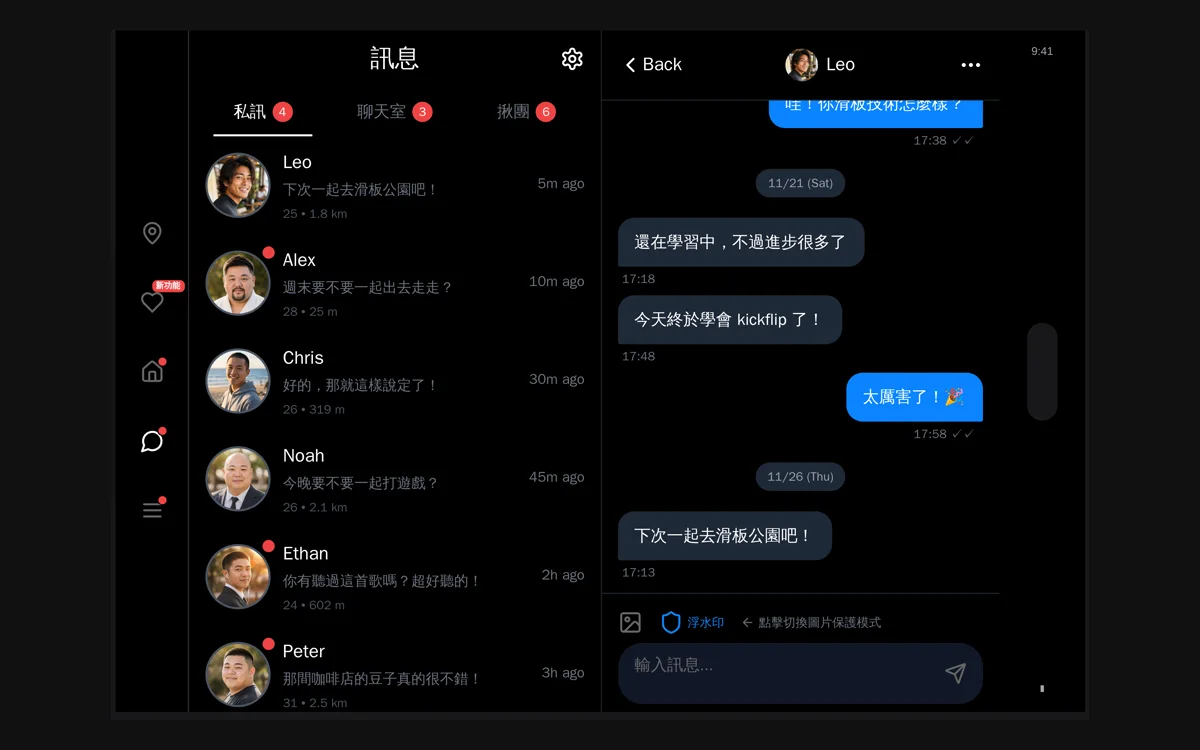
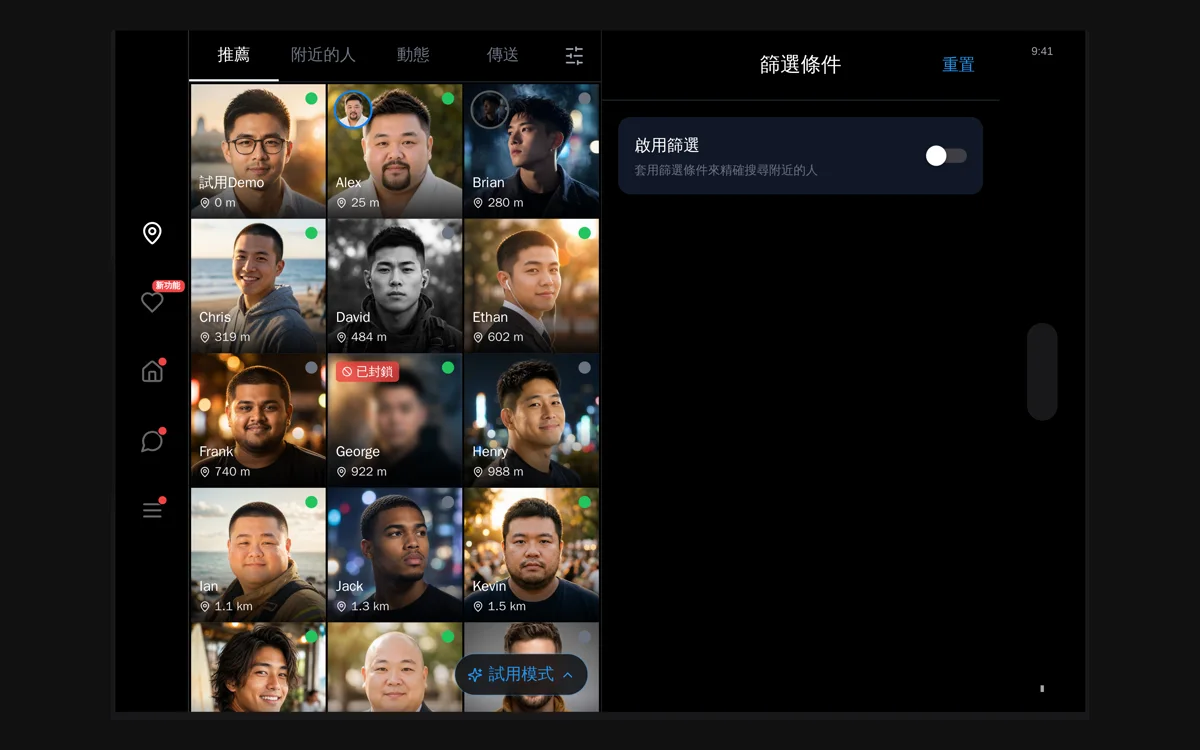
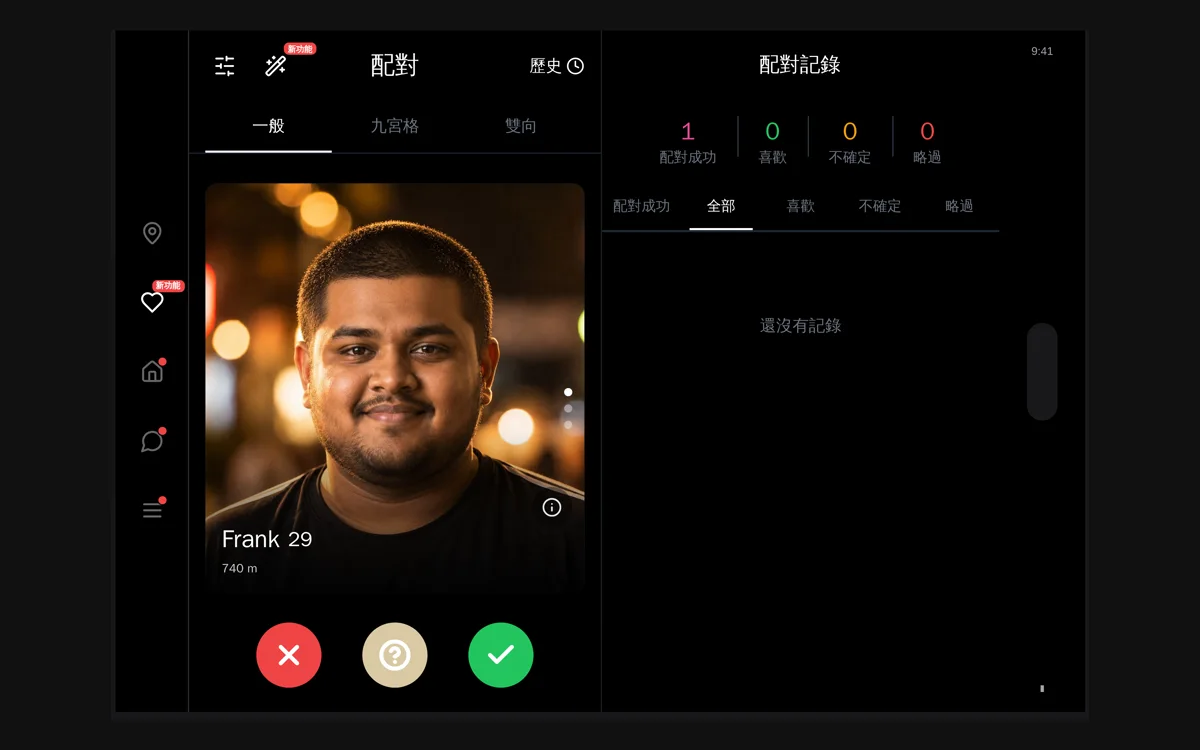
On the inner screen in landscape, the screen splits into left and right columns: the left is a list, and the right is the page you tapped.
Chat: message list on the left, conversation on the right
This is the most useful screen. On the left are all your conversations. Tap one person and the chat opens on the right. To switch to someone else, just tap another name on the left, without going back to the list first.
Explore: people on the left, filters on the right
The right column on the Explore page defaults to filters. You can adjust the filters while watching the results on the left change. Tap a person's photo and the right column switches to their profile.
Matching: swipe cards on the left, history on the right
The right column of swipe matching is your match history, where you can see which matches succeeded and which haven't replied yet.
One small thing more: when you fold, open or rotate, you stay on the same page and the same scroll position, and don't jump back to the home page.
Does it work half-open on a table?
Yes. When it is half-open at a book-like angle, the two columns sit on either side of the fold, and content isn't cut by the fold.
The iPhone Duo can stand half-open on a table. Near the fold in the middle it is hard to read, so HisLinks keeps the left column to the left of the fold and starts the right column to the right of it, leaving the middle empty.
If at some angle there isn't room for two columns, the screen automatically goes back to a single column, placed on the wider side.
Is the sign-in screen covered too?
Yes. Before you sign in, on the inner screen in landscape the left half is sign-in and sign-up, and the right half is a photo wall.

How do you update to the version that supports iPhone Duo?
Update HisLinks in the App Store to version 1.2.7 or newer, with no extra setup.
- Open the App Store and tap your profile picture at the top right.
- Scroll down to HisLinks and tap "Update." If it isn't in the list, just search for HisLinks.
- After updating, open the app and unfold the iPhone Duo, and the layout switches automatically.
From 1.2.7, HisLinks is built with the iOS 27 SDK. Apple's rule is that after April 2027, only apps built with the iOS 27 SDK or later can be uploaded to the App Store, so other apps will gradually update too. We chose to finish ahead of that.
If you don't have an iPhone Duo, no problem: on a regular iPhone the screen looks the same as before. If you haven't downloaded the app yet, you can go back to the home page to get the app, and the features are described on the features page.
Frequently asked questions
Which gay dating apps support iPhone Duo?
As of November 2026, to our knowledge HisLinks is the first gay dating app to fully support the iPhone Duo's screen resolutions, and the iOS version supports both inner and outer screens from 1.2.7. For other apps, you can look on the App Store page for a "Made for iPhone Duo" mark, or check the app's update notes.
I don't use an iPhone Duo. Will the screen change after updating?
No. On a regular iPhone the layout is the same as before. The two columns only appear when the screen is wide enough.
Do Android foldables get two columns too?
Not yet. On foldable phones, the Android version shows the normal phone layout. For now, the two-column layout is only available on the iOS version, on iPhone Duo.
This layout is decided by window width, not by recognizing only the iPhone Duo, so the same design can later be used on large Android foldables, such as the Samsung Galaxy Z Fold8, Galaxy Z Fold8 Ultra, Google Pixel 11 Pro Fold, OPPO Find N6, vivo X Fold6 and HONOR Magic V6. Small flip-style foldables like the Galaxy Z Flip8 open to the ratio of a regular phone and use the original layout.
For when the Android version will open up two columns, please go by the update notes in the app.
After opening, the screen is still only a block in the middle. What should I do?
First check that the app is updated to 1.2.7 or newer. If it is still the same after updating, close the app completely and reopen it. If it still doesn't improve, email [email protected].
Sources
- Designing for iPhone Duo (Apple Human Interface Guidelines)
- Developers bring incredible new app experiences to iPhone Duo (Apple Newsroom, 2026-10-22)
- Here's how iPhone Duo treats apps not optimized for the foldable display (9to5Mac, 2026-09-09)
- By when do we need to support iPhone Duo? (DevelopersIO, 2026-09-14)
- [心得] DUO 使用體驗 (PTT iOS board, 2026-10-31, Chinese-language page)
- iPhone Duo tech specs (Apple)
- App Store pages and version histories of each app (Grindr, Hornet, HeeSay, Jack'd, 9monsters, GROWLr, SCRUFF, Gsland, Prido, checked November 2026)